Set up the Kubernetes MCP server
The Kubernetes MCP server gives AI agents natural-language access to any Kubernetes or OpenShift cluster: listing resources, reading pod logs, scaling workloads, running exec sessions, and more. This guide covers preparing a static kubeconfig for your cluster and adding the server from the MintMCP store.
Prerequisites
- A MintMCP admin account
- A Kubernetes or OpenShift cluster
kubectlwith admin access to the target cluster
Two requirements apply to every cluster:
- Network access: The cluster API server must be reachable from MintMCP's runtime. Public endpoints work directly. For private or VPC-only clusters, allowlist MintMCP's dedicated egress IP on your API server.
- Static credentials: The kubeconfig must contain embedded credentials (a token or client certificate). Exec-based authentication plugins (
aws eks get-token,gke-gcloud-auth-plugin,kubelogin) run as local processes and cannot execute inside MintMCP's container runtime. The steps below show how to export a static kubeconfig for each platform.
Get a static kubeconfig
An administrator configures one shared kubeconfig for the connector at install time. The ServiceAccount token it contains is a single cluster identity that every user's tool calls run as. Follow the steps for your cluster's platform.
- Amazon EKS
- Google GKE
- Azure AKS
- Self-managed
aws eks update-kubeconfig creates a kubeconfig that uses the aws eks get-token exec plugin. This plugin cannot run inside MintMCP, so replace it with a ServiceAccount token.
With your EKS cluster already configured in kubectl:
- Create a ServiceAccount and bind it to a ClusterRole:
kubectl create serviceaccount mintmcp -n kube-system
kubectl create clusterrolebinding mintmcp \
  --clusterrole=view \
  --serviceaccount=kube-system:mintmcp
Replace view with cluster-admin to grant full read/write access, or bind a more specific role.
- Generate a token valid for one year:
TOKEN=$(kubectl create token mintmcp -n kube-system --duration=8760h)
- Export the cluster endpoint and certificate authority from your existing kubeconfig:
ENDPOINT=$(kubectl config view --minify -o jsonpath='{.clusters[0].cluster.server}')
CA=$(kubectl config view --minify --raw -o jsonpath='{.clusters[0].cluster.certificate-authority-data}')
- Write the static kubeconfig:
cat <<EOF
apiVersion: v1
kind: Config
clusters:
- cluster:
    server: $ENDPOINT
    certificate-authority-data: $CA
  name: cluster
contexts:
- context:
    cluster: cluster
    user: mintmcp
  name: mintmcp
current-context: mintmcp
users:
- name: mintmcp
  user:
    token: $TOKEN
EOF
Copy the full output. You'll paste it into MintMCP in the next section.
gcloud container clusters get-credentials creates a kubeconfig that uses the gke-gcloud-auth-plugin exec plugin. This plugin cannot run inside MintMCP, so replace it with a ServiceAccount token.
With your GKE cluster already configured in kubectl:
- Create a ServiceAccount and bind it to a ClusterRole:
kubectl create serviceaccount mintmcp -n kube-system
kubectl create clusterrolebinding mintmcp \
  --clusterrole=view \
  --serviceaccount=kube-system:mintmcp
Replace view with cluster-admin to grant full read/write access, or bind a more specific role.
- Generate a token valid for one year:
TOKEN=$(kubectl create token mintmcp -n kube-system --duration=8760h)
- Export the cluster endpoint and certificate authority from your existing kubeconfig:
ENDPOINT=$(kubectl config view --minify -o jsonpath='{.clusters[0].cluster.server}')
CA=$(kubectl config view --minify --raw -o jsonpath='{.clusters[0].cluster.certificate-authority-data}')
- Write the static kubeconfig:
cat <<EOF
apiVersion: v1
kind: Config
clusters:
- cluster:
    server: $ENDPOINT
    certificate-authority-data: $CA
  name: cluster
contexts:
- context:
    cluster: cluster
    user: mintmcp
  name: mintmcp
current-context: mintmcp
users:
- name: mintmcp
  user:
    token: $TOKEN
EOF
Copy the full output. You'll paste it into MintMCP in the next section.
az aks get-credentials creates a kubeconfig that uses the kubelogin exec plugin for Microsoft Entra-backed clusters. This plugin cannot run inside MintMCP, so replace it with a ServiceAccount token.
With your AKS cluster already configured in kubectl:
- Create a ServiceAccount and bind it to a ClusterRole:
kubectl create serviceaccount mintmcp -n kube-system
kubectl create clusterrolebinding mintmcp \
  --clusterrole=view \
  --serviceaccount=kube-system:mintmcp
Replace view with cluster-admin to grant full read/write access, or bind a more specific role.
- Generate a token valid for one year:
TOKEN=$(kubectl create token mintmcp -n kube-system --duration=8760h)
- Export the cluster endpoint and certificate authority from your existing kubeconfig:
ENDPOINT=$(kubectl config view --minify -o jsonpath='{.clusters[0].cluster.server}')
CA=$(kubectl config view --minify --raw -o jsonpath='{.clusters[0].cluster.certificate-authority-data}')
- Write the static kubeconfig:
cat <<EOF
apiVersion: v1
kind: Config
clusters:
- cluster:
    server: $ENDPOINT
    certificate-authority-data: $CA
  name: cluster
contexts:
- context:
    cluster: cluster
    user: mintmcp
  name: mintmcp
current-context: mintmcp
users:
- name: mintmcp
  user:
    token: $TOKEN
EOF
Copy the full output. You'll paste it into MintMCP in the next section.
For kubeadm, k3s, or other self-hosted clusters, use a ServiceAccount token. If your existing kubeconfig already uses static credentials (client certificate or a token without an exec block), you can paste it directly. Otherwise, create a ServiceAccount following the steps below.
- Create a ServiceAccount and bind it to a ClusterRole:
kubectl create serviceaccount mintmcp -n kube-system
kubectl create clusterrolebinding mintmcp \
  --clusterrole=view \
  --serviceaccount=kube-system:mintmcp
Replace view with cluster-admin to grant full read/write access, or bind a more specific role.
- Generate a token valid for one year:
TOKEN=$(kubectl create token mintmcp -n kube-system --duration=8760h)
- Export the cluster endpoint and certificate authority from your existing kubeconfig:
ENDPOINT=$(kubectl config view --minify -o jsonpath='{.clusters[0].cluster.server}')
CA=$(kubectl config view --minify --raw -o jsonpath='{.clusters[0].cluster.certificate-authority-data}')
- Write the static kubeconfig:
cat <<EOF
apiVersion: v1
kind: Config
clusters:
- cluster:
    server: $ENDPOINT
    certificate-authority-data: $CA
  name: cluster
contexts:
- context:
    cluster: cluster
    user: mintmcp
  name: mintmcp
current-context: mintmcp
users:
- name: mintmcp
  user:
    token: $TOKEN
EOF
Copy the full output. You'll paste it into MintMCP in the next section.
Add Kubernetes to MintMCP
The Kubernetes connector is pre-listed in the MintMCP MCP store. Installing it opens a Configure Kubernetes screen with two fields to fill, so there's no config to author.
- In MintMCP, go to MCP store > Manage store.
- Find Kubernetes in the recommended servers list and click Install.
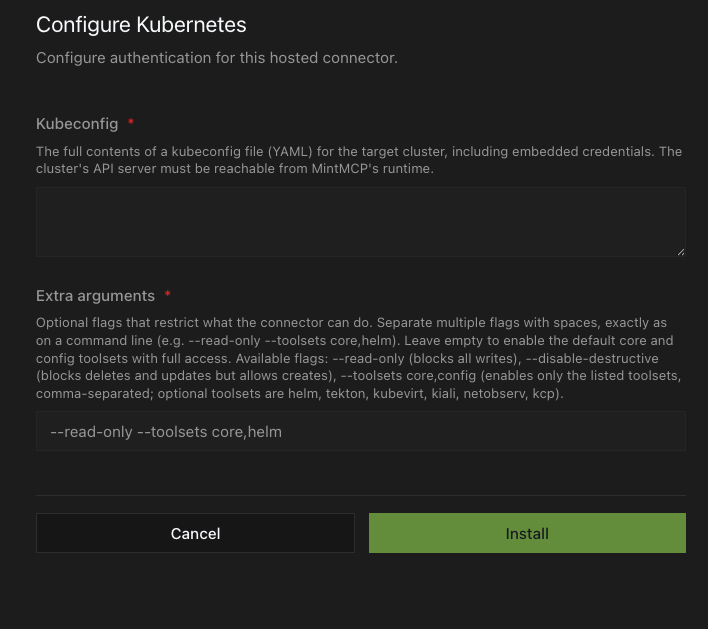
- In Kubeconfig, paste the full static kubeconfig output from the steps above. This one kubeconfig is shared by every user of the connector.
- In Extra arguments, add any flags that restrict what the connector can do, separated by spaces exactly as on a command line. Leave it empty to enable the default
coreandconfigtoolsets with full access.
| Flag | Effect |
|---|---|
--read-only | Blocks all write operations |
--disable-destructive | Blocks delete and update operations; allows creates |
--toolsets core,config | Enables only the listed toolsets (comma-separated) |
Optional toolsets you can add to --toolsets: helm, tekton, kubevirt, kiali, netobserv, kcp.
- Click Install.
Security considerations
- The connector authenticates with a single shared ServiceAccount, so every user's tool calls run under the same Kubernetes RBAC identity. Cluster audit logs attribute all activity to that ServiceAccount, not to individual people. If you need per-person audit trails or distinct permissions, create a separate connector with its own ServiceAccount for each group.
- Scope the ServiceAccount's ClusterRoleBinding to the minimum access needed.
viewis read-only across the cluster;cluster-admingrants full access. - Tokens generated with
kubectl create token --duration=8760hexpire after one year. Rotate them before expiry by updating the connector's kubeconfig. --read-onlyprevents all write operations at the connector level, regardless of the user's Kubernetes RBAC permissions.--disable-destructiveblocks deletes and updates but still allows creates.- The connector runs inside MintMCP's infrastructure; the cluster API server is the only endpoint it contacts. No cluster data is stored in MintMCP beyond what individual tool calls return.
Troubleshooting
- Connection timeout: The cluster API server is not reachable from MintMCP. Verify the endpoint is publicly accessible, or contact enterprise@mintmcp.com to get the dedicated egress IP for your connector and add it to your API server allowlist.
- Authentication error or "exec plugin not found": The kubeconfig contains an exec-based plugin. Follow the steps in Get a static kubeconfig to export a static kubeconfig with an embedded token.
- Forbidden: The ServiceAccount's Kubernetes RBAC policy does not permit the requested operation. This is expected behavior when using
viewor a limited role. Update the ClusterRoleBinding or bind a more permissive role to grant additional access.
Next steps
- Tool customization: Control which Kubernetes tools are exposed to users
- MCP gateway administration: Manage access and permissions