MintMCP gateway
Without a gateway, MCP creates problems:
| Who | Problem |
|---|---|
| Users | Don't know which servers to trust, struggle with STDIO setup, overwhelmed by 100+ tools |
| IT & Security | Credentials scattered across laptops, unvetted servers, no audit logs |
| Developers | OAuth complexity, tool name conflicts, client compatibility issues |
MintMCP solves this by providing a single entrypoint that authenticates users, curates tools, and logs everything.
Example
A "Sales Intelligence" Virtual MCP for account executives. Admins curate connectors for CRM, contracts, and communication. Sales reps connect from ChatGPT or Claude, authenticate once through MintMCP, and the gateway controls which connectors they can reach. All usage is logged.
Architecture
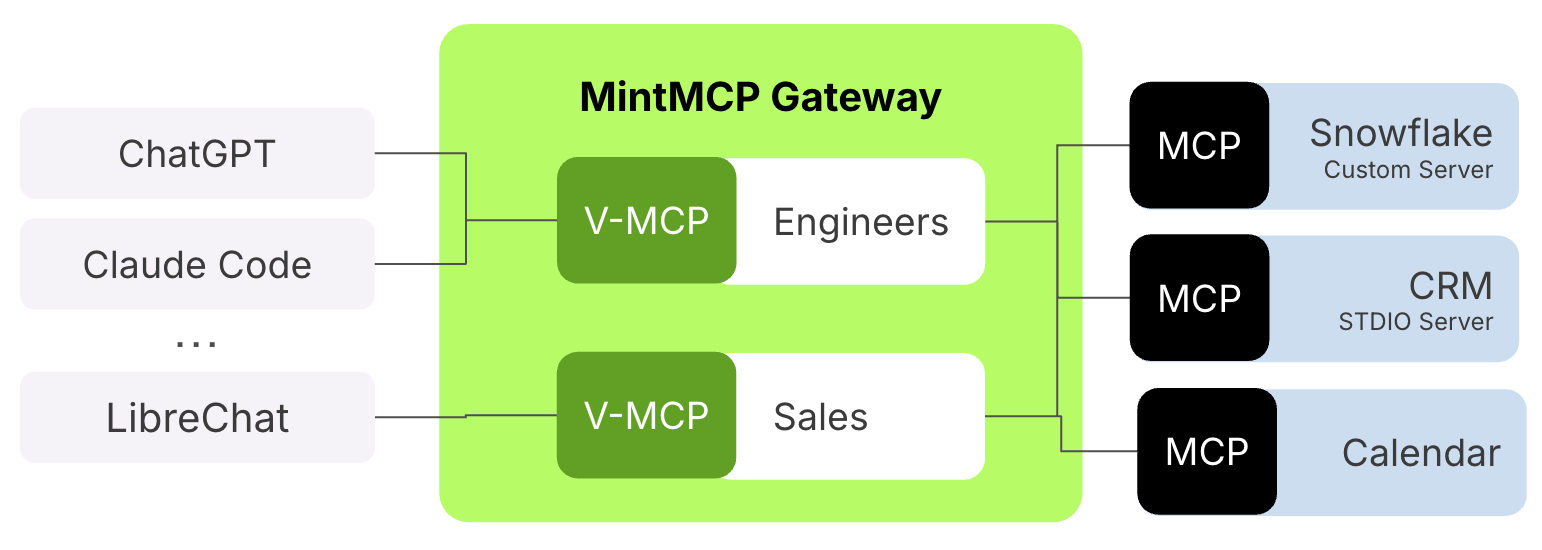
Request flow
- AI client initiates OAuth with MintMCP
- MintMCP validates identity, checks policies, returns available tools
- Client calls a tool → MintMCP routes to the right connector with credentials
- Connector executes, MintMCP logs the call and returns the response
See Core concepts for details.
Components
| Component | What it does |
|---|---|
| AI clients | ChatGPT, Claude, Cursor, and any MCP-compatible agent—initiate OAuth and call tools |
| MintMCP gateway | Authentication, authorization, routing, logging |
| Virtual MCPs | Logical groupings of connectors exposed as single endpoints |
| Connectors | Hosted, remote, or STDIO servers that talk to downstream systems |
| Observability | Dashboards, audit trails, usage analytics |
Hosted connectors
When an admin adds a hosted connector (see Add a hosted connector), MintMCP runs the MCP server inside its managed data plane on Fly.io Machines. The gateway is the only thing that talks to it—the connector is never exposed to the public internet.
Network topology
- Private network. The gateway reaches each hosted connector over Fly's private network—not via a public hostname. There is no inbound route from the internet to the connector.
- Routing. The gateway can address either the connector's app (load-balanced through Fly's proxy) or a specific Machine ID directly. Direct addressing is used when the gateway needs a session pinned to one Machine.
- Transport. HTTP streamable is the default. For STDIO-based MCP servers, a thin wrapper inside the Machine marshals the stdio session over HTTP so the gateway can speak the same transport everywhere.
- Gateway → Machine auth. Every request carries a short-lived HS256 JWT (
x-mintmcp-hosted-authheader, ~2-minute TTL) signed with a key the Machine knows. This authenticates the gateway to the connector even though the network is already private—so a misrouted or stale request can't accidentally hit another tenant's connector.
How credentials reach the connector
The connector never holds long-lived credentials. On each call, MintMCP injects the right credential as a request header (HTTP) or env var (STDIO). Customers usually care about where the underlying credential lives:
| Auth type | Where the credential lives | Per-user? |
|---|---|---|
| Inline env var / API key | Encrypted in MintMCP's database | Optional (admin picks Global or Per-User scope) |
| Per-user OAuth | Access + refresh tokens encrypted in MintMCP's database; refreshed automatically | Yes |
| Per-user AWS SSO | SSO tokens encrypted in MintMCP's database; exchanged for short-lived STS credentials on each call | Yes |
All credential material stored in MintMCP's database is encrypted at rest with rotated AES keys. See OAuth for hosted connectors and Authentication models for setup details.
Governance capabilities
Every request through the gateway is governed:
| Capability | What it does |
|---|---|
| Request logging | Records every tool call with user, timestamp, and payload |
| Access policies | Controls which users can reach which MCP servers |
| Credential management | Stores secrets centrally instead of on user machines |
| SSO integration | Authenticates users through Okta, Google, or Microsoft Entra ID |
These capabilities mean security teams can approve AI tool deployment with full visibility, and compliance teams get the audit trails they need for SOC 2, HIPAA, and internal reporting.