Configure a Coworker Agent
Adjust an agent's model, triggers, tools, secrets, and sandbox from its detail page in MintMCP, and, for platform-managed agents, from the agent itself.
Where configuration lives
Where you edit configuration depends on how the agent is managed (see What lives where):
- Platform-managed (V2), the default for new agents. Configuration lives in MintMCP. Edit it on the agent's Settings and Connectors tabs, and the agent can read and replace its own configuration through the
get_agent_configandupdate_agent_configtools (see Let the agent manage its own configuration). - GitHub-managed (legacy). The
agent.ymlfile in the agent's directory is the source of truth. The Settings tab edits it for you, the Update Agent button lets you describe a change in plain language and review it as a proposed change, and editing the file in git works too, so all three end up in the same place.
MintMCP validates the configuration either way and surfaces warnings on the agent's page (for example, a secret referenced but never declared), each with a one-click fix. The agent.yml snippets below show the underlying fields; for a platform-managed agent, the same fields are set through the UI or the agent's own tools rather than a file in the repository.
Harness and model
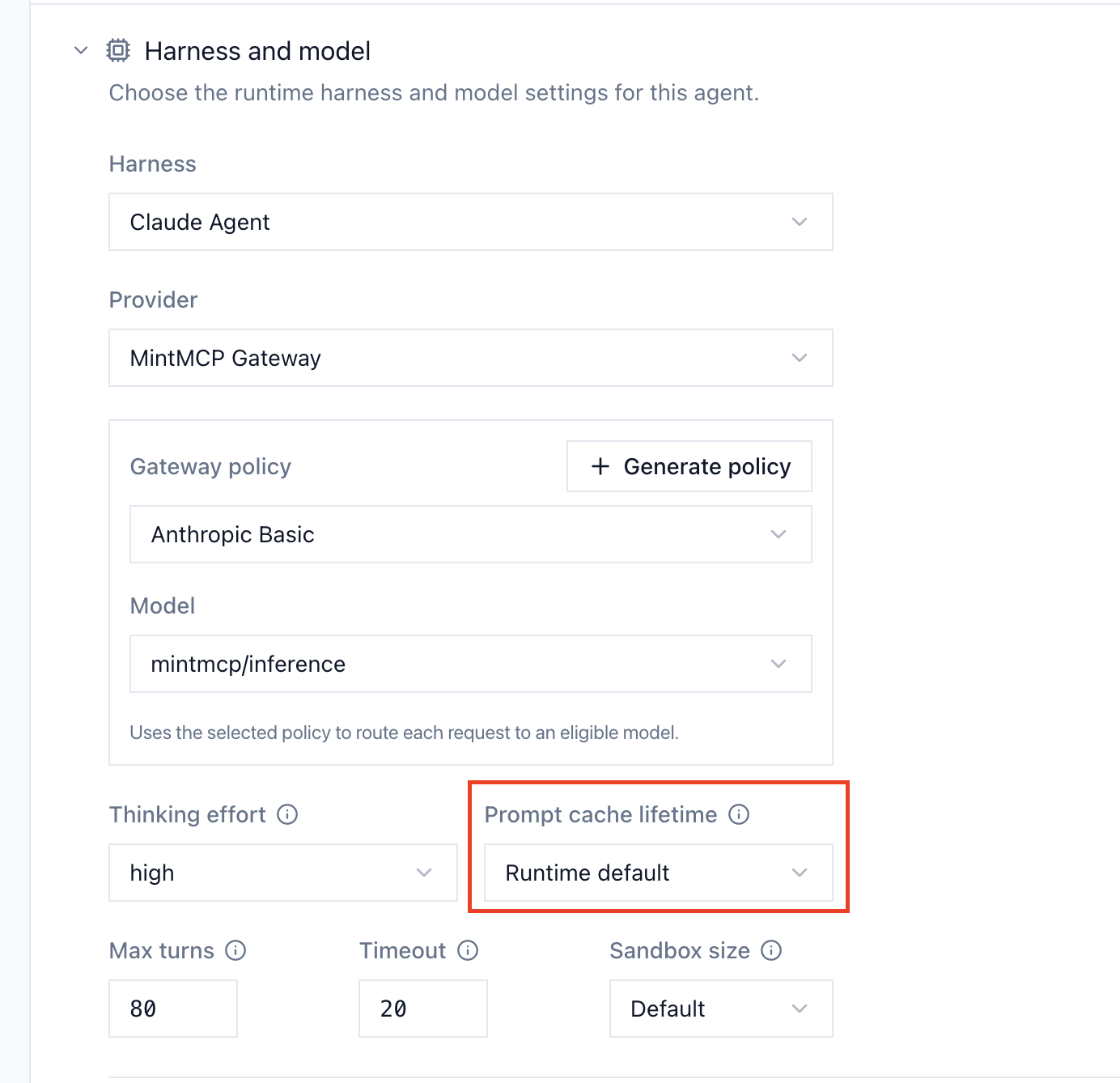
The Harness and model card on the Settings tab picks the runtime that drives the agent.
| Harness | Provider | Models | Credential |
|---|---|---|---|
| Claude Agent | Anthropic API | Claude Opus, Sonnet, Haiku, or Fable | Anthropic API key, or a Claude subscription token from claude setup-token |
| Claude Agent | Amazon Bedrock | Claude models via Bedrock | Bedrock API key, region, and model ID |
| Claude Agent | Claude-compatible API | Any compatible model (e.g. GLM-5.2 via Fireworks) | API key for your provider |
| Codex | OpenAI | GPT-5.5 (default) and other OpenAI models | OpenAI API key or Codex auth file |
Claude Agent and Codex harnesses support a thinking-effort setting (low, medium, high, or xhigh — default high) to trade depth for speed.
Prompt cache lifetime
Set how long a Claude Agent's conversation stays cached between turns with Prompt cache lifetime on the Harness and model card. When a follow-up arrives after the cache expires, the agent reprocesses the whole conversation history, so an agent that people reply to in Slack threads after a pause runs faster and cheaper on the 1-hour lifetime.
| Option | runtime.prompt_cache_ttl | Lifetime |
|---|---|---|
| Runtime default | default, or unset | 5 minutes with an API key or cloud provider, 1 hour with a Claude subscription |
| 5 minutes | 5m | 5 minutes |
| 1 hour | 1h | 1 hour. Cache writes cost more than 5-minute writes, and cache reads cost the same |
The setting takes effect on the agent's next run and covers its main conversation, while sub-agents keep the runtime default. Codex agents ignore it.
Triggers
triggers:
  schedule:
    - "0 13 * * *"      # daily at 1:00 PM UTC
  workflow_dispatch: true
| Trigger | Configuration |
|---|---|
| Schedule | One or more cron expressions under triggers.schedule, evaluated in UTC |
| Manual | The Run button collects a prompt and model; add custom inputs under triggers.workflow_dispatch_inputs |
| Slack mention | Set up on the Settings tab, see Connect a Coworker Agent to Slack |
For a platform-managed agent, the schedule is shown on the Overview tab but isn't edited there. Ask the agent to add or change a schedule, and it updates triggers.schedule in its own configuration; MintMCP rewrites the trigger-bridge workflow and rejects an invalid cron expression before anything is written. On a branch-protected repo the new schedule only starts firing once that workflow change lands: merge the pull request it opens, or have an admin run Sync workflow on the agent.
By default, messages from other bots don't trigger the agent. To let a specific bot (like another agent) trigger this one, list its bot ID under triggers.slack_allowed_bot_ids.
Setting concurrency: true keeps one run per Slack conversation, so a burst of mentions in a thread doesn't fan out into parallel runs.
Runtime limits
Runs default to a 20-minute timeout. Raise or lower it with runtime.timeout_minutes, and cap the number of agent turns per run with runtime.max_turns — generous enough limits let an agent finish one task well, while tight limits keep scheduled runs cheap.
Tools and connectors
Give the agent access to your MCP tools from the Connectors tab. A platform-managed agent has its own identity bundle, so click + Connector to add a connector to that bundle. Every call the agent makes flows through the gateway under the agent's own identity and shows up in your audit log like any other gateway traffic, and its tools are added to the agent's allowlist.
allowed_tools is a real allowlist: a tool not in the list is not callable, even if its server is configured. Trim it to just what the agent needs.
A legacy GitHub-managed agent can also declare MCP servers directly in agent.yml (stdio commands or HTTP endpoints, with {{secrets.KEY}} templating for credentials). Direct servers don't pass through the gateway, so prefer bundle connectors when you want gateway-level audit and rules.
Secrets
Secrets are stored in MintMCP (encrypted at rest) and injected at run time — never written into agent.yml.
| Scope | Field | Use for |
|---|---|---|
| Agent | secret_keys | Credentials specific to one agent, like its vMCP key |
| Repository | repo_secret_keys | Credentials shared by all agents in the repo, like a Claude token |
The Secrets section on the Settings tab shows every declared secret with its set/unset status and lets you add or replace values. Reference secrets in agent.yml as {{secrets.MY_KEY}}: the validator rejects hardcoded credentials, so a pasted API key never lands in git.
For secrets the agent shouldn't see in plaintext, configure secret brokering per secret with a domain allowlist: the run gets a placeholder, and MintMCP injects the real value only into requests to the allowed domains.
Sandbox
Each run executes in a sandbox with restricted network egress. GitHub, Anthropic, and package-registry endpoints are reachable by default; add anything else the agent needs under sandbox.allowed_domains:
sandbox:
  enabled: true
  allowed_domains:
    - api.stripe.com
The allowlist only adds domains — you can't remove the defaults the agent needs to function. See Coworker Agents security for what the sandbox does and doesn't guarantee.
Workspaces
The Workspaces tab checks additional repositories out alongside the agent's own, which suits agents whose definition lives in one repo but whose work targets others. Click Add workspace and enter a name and the repository's owner/repo. MintMCP detects access automatically: repositories the GitHub App can reach are checked out with authentication, and public repositories work without it. The agent's definition repository is marked Primary.
Sub-agents and skills
- Sub-agents — Markdown files in the agent directory's
.claude/agents/folder define focused helpers the agent can delegate to. They appear on the Sub-agents tab. - Skills — reusable automations shared across agents in the repository, invoked like slash commands. Browse your organization's skills on the Skills page under Coworker Agents.
Let the agent manage its own configuration
A platform-managed agent has two tools in its MCP tool list for reading and changing its own configuration:
| Tool | What it does |
|---|---|
get_agent_config | Returns the agent's current configuration and its version |
update_agent_config | Replaces the configuration, with a version check so a concurrent edit can't be clobbered |
An agent uses these to adjust its own schedule, tools, or other settings between runs, and you can ask it to make a change in plain language. The agent's slug and agent_dir are immutable, and an invalid triggers.schedule cron expression is rejected before anything is written. A legacy GitHub-managed agent can't use these tools, because its configuration is still the agent.yml file in the repository.
Example configuration (agent.yml)
For a platform-managed agent, these fields are set through the UI and the agent's own tools. The same fields are written directly in agent.yml for a legacy GitHub-managed agent:
name: Bella Billing Agent
harness: claude
runtime:
  model: opus
  timeout_minutes: 30
  prompt_cache_ttl: 1h
triggers:
  schedule: "0 13 * * *"
  workflow_dispatch: true
concurrency: true
secret_keys:
  - VMCP_KEY_BILLING
allowed_tools:
  - stripe_list_invoices
  - stripe_get_customer
sandbox:
  enabled: true
  allowed_domains:
    - api.stripe.com
hooks:
  mintmcp_monitor: true
The mintmcp_monitor hook is on by default and streams the session into Agent Monitor, so you can watch what the agent does turn by turn.