Set up the remote Azure DevOps MCP server
Microsoft's remote Azure DevOps MCP server lets AI agents work with Azure DevOps: reading and updating work items, reviewing pull requests, running pipelines, and searching wikis and code, all under each user's own permissions. This guide covers preparing your Microsoft Entra tenant, registering a Microsoft Entra app for OAuth, and connecting the server to MintMCP from the recommended server catalog.
Prerequisites
- A MintMCP admin account
- An Azure DevOps Services organization connected to a Microsoft Entra tenant
- Application Administrator, Cloud Application Administrator, or Global Administrator in that tenant
- Users need a work or school account in the tenant and membership in the Azure DevOps organization
Provision the Azure DevOps MCP application
The remote server's API is published by the Azure DevOps MCP enterprise application, which isn't created in your tenant automatically, so an admin must add it before its permissions can be granted.
-
Sign in to the Azure portal and open Cloud Shell (Bash) from the top bar.
-
Run:
az ad sp create --id 2a72489c-aab2-4b65-b93a-a91edccf33b8 -
Confirm the output includes
"displayName": "Azure DevOps MCP".
Register a Microsoft Entra app
Microsoft Entra does not support dynamic client registration, so an admin registers an app once and MintMCP uses its client ID and secret for the OAuth flow.
-
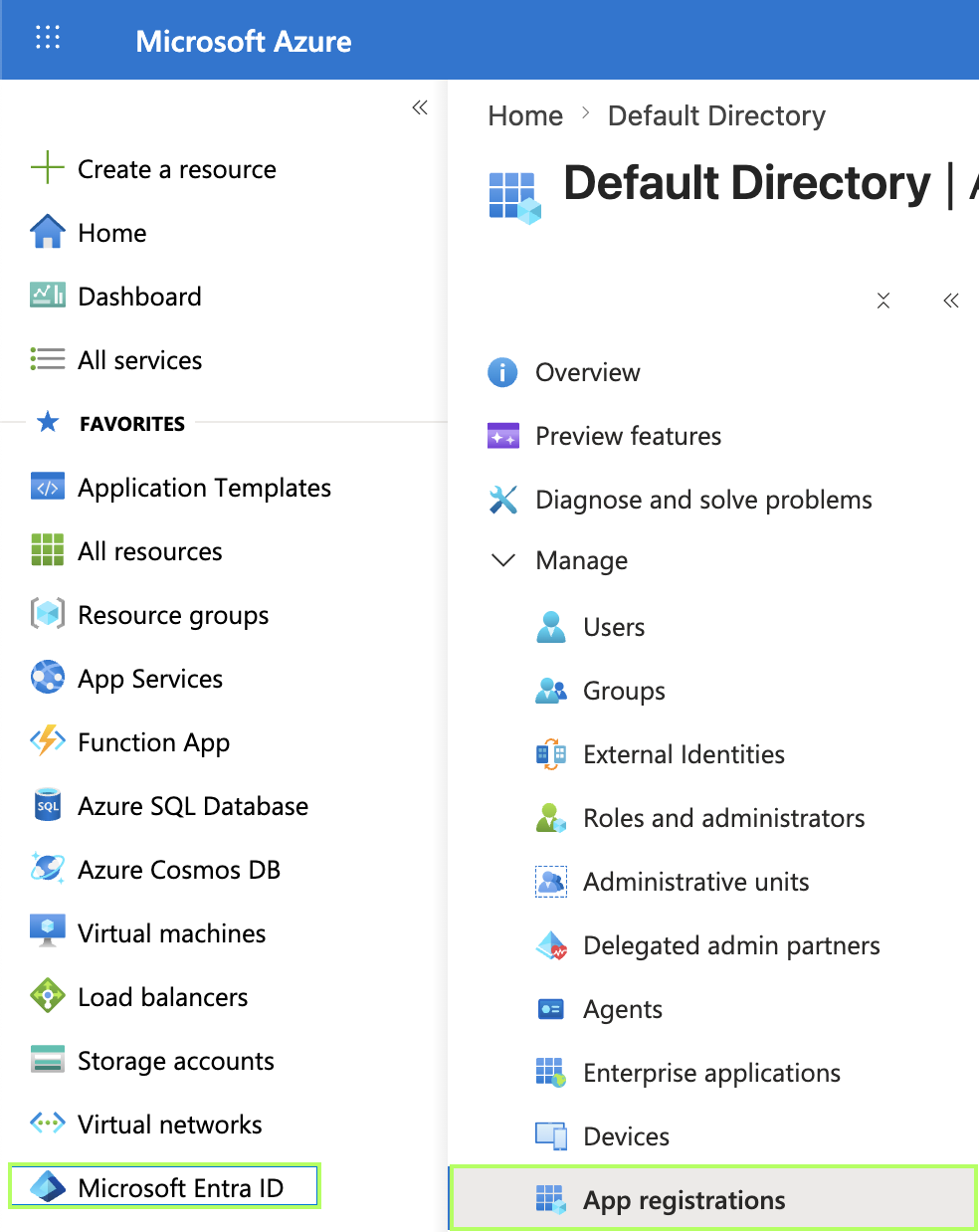
Go to portal.azure.com > Microsoft Entra ID > App registrations.
-
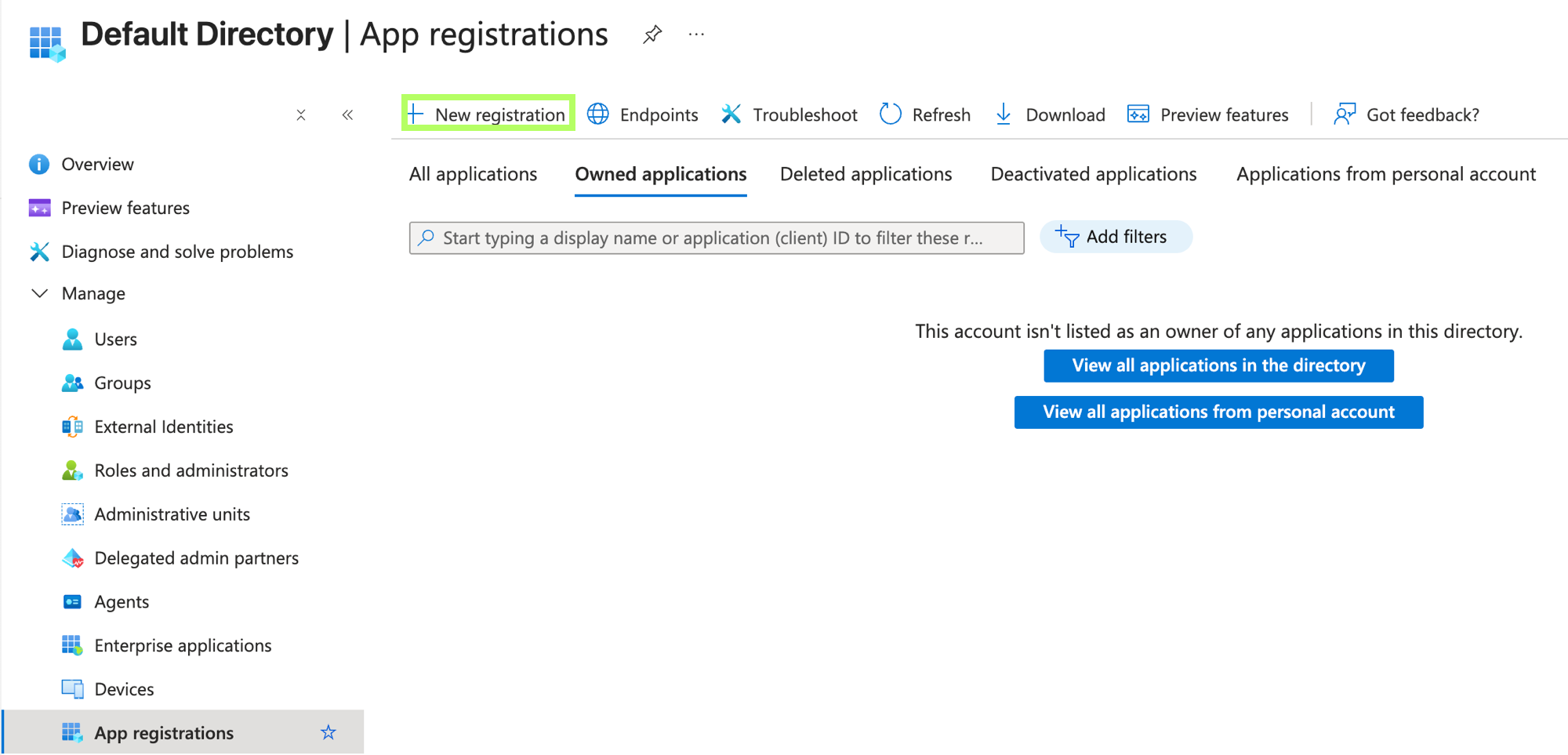
Click New registration.
-
Enter a name, for example
MintMCP Azure DevOps, and under Supported account types, select Single tenant only. -
Under Redirect URI (optional), select Web and enter the redirect URI for your MintMCP region:
MintMCP region Redirect URI US https://app.mintmcp.com/oauth/callbackEU https://eu.mintmcp.com/oauth/callback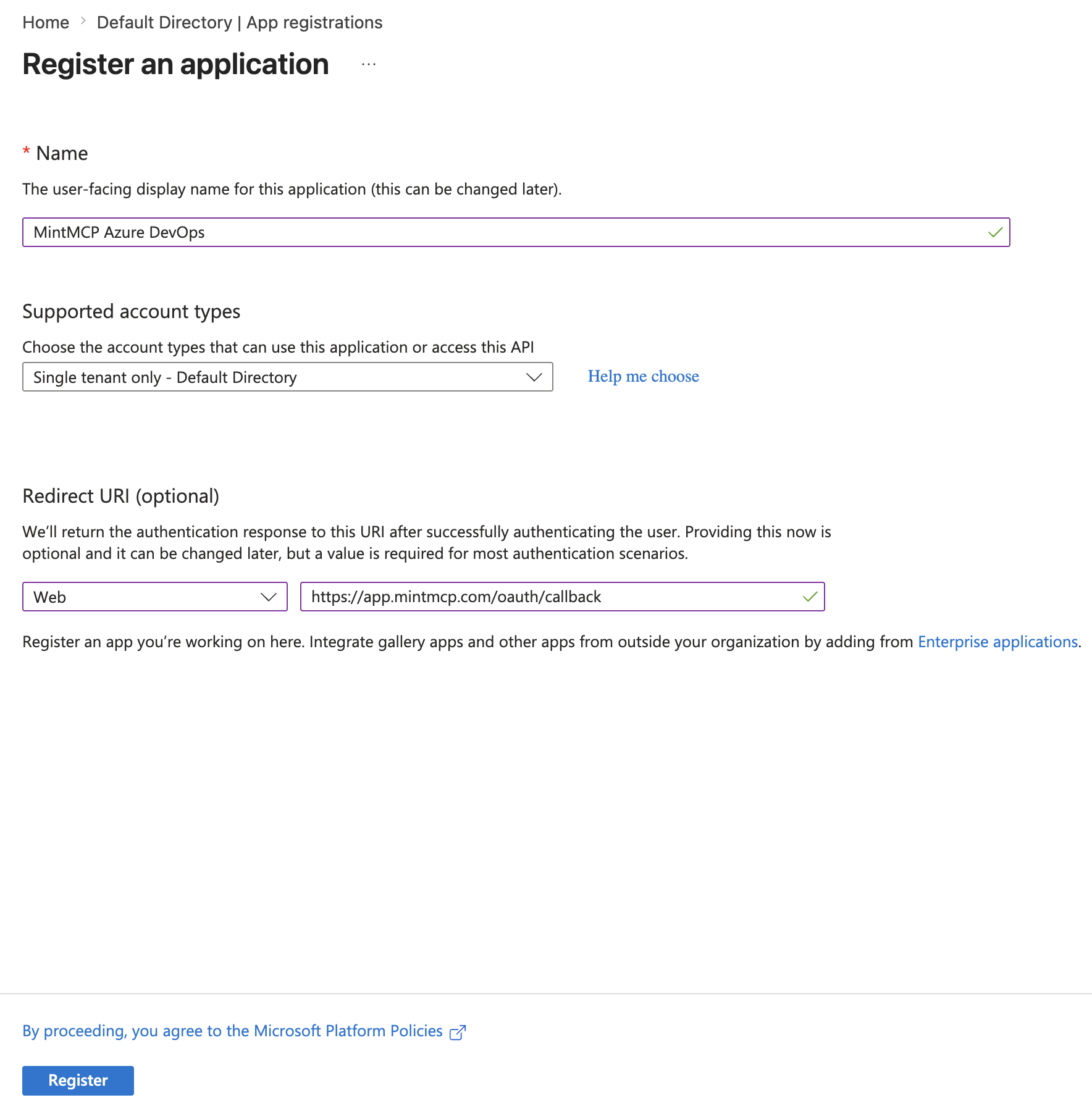
-
Click Register.
-
Go to API permissions > Add a permission > APIs my organization uses, and search for
2a72489c-aab2-4b65-b93a-a91edccf33b8. -
Select Azure DevOps MCP > Delegated permissions, and add
Ado.Mcp.Toolsplus the permissions for the areas your team needs:Permission Grants Ado.Mcp.ToolsAccess to the remote MCP server tools repos.read/repos.writeRead, or read and update, repositories, branches, and pull requests wit.read/wit.writeRead, or read and update, work items, comments, and links wiki.read/wiki.writeRead, or read and update, wiki pages pipelines.read/pipelines.writeRead, or read and queue, builds and pipelines work.read/work.writeRead, or read and update, iterations, capacity, and team settings testplan.read/testplan.writeRead, or read and update, test plans, suites, and results advsec.readRead Advanced Security alerts Select Azure DevOps MCP, not Azure DevOps. The Azure DevOps API (
user_impersonation) issues tokens the remote server rejects. -
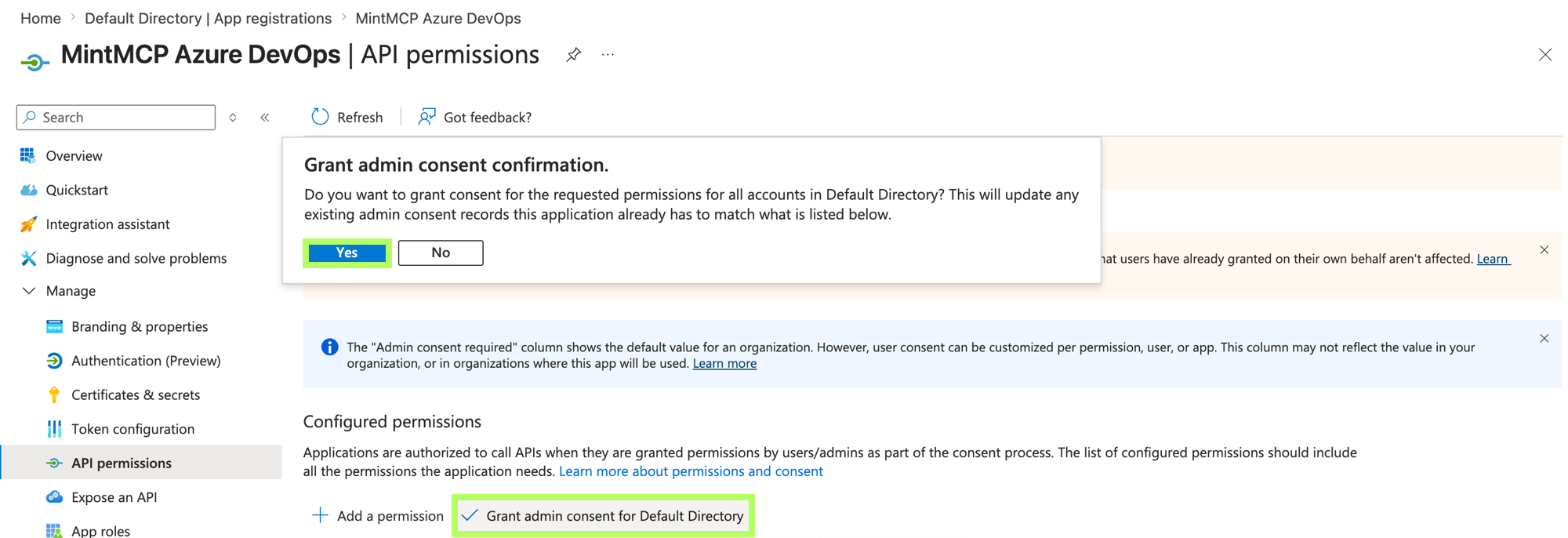
Click Grant admin consent and confirm, so users are not individually prompted to consent.
-
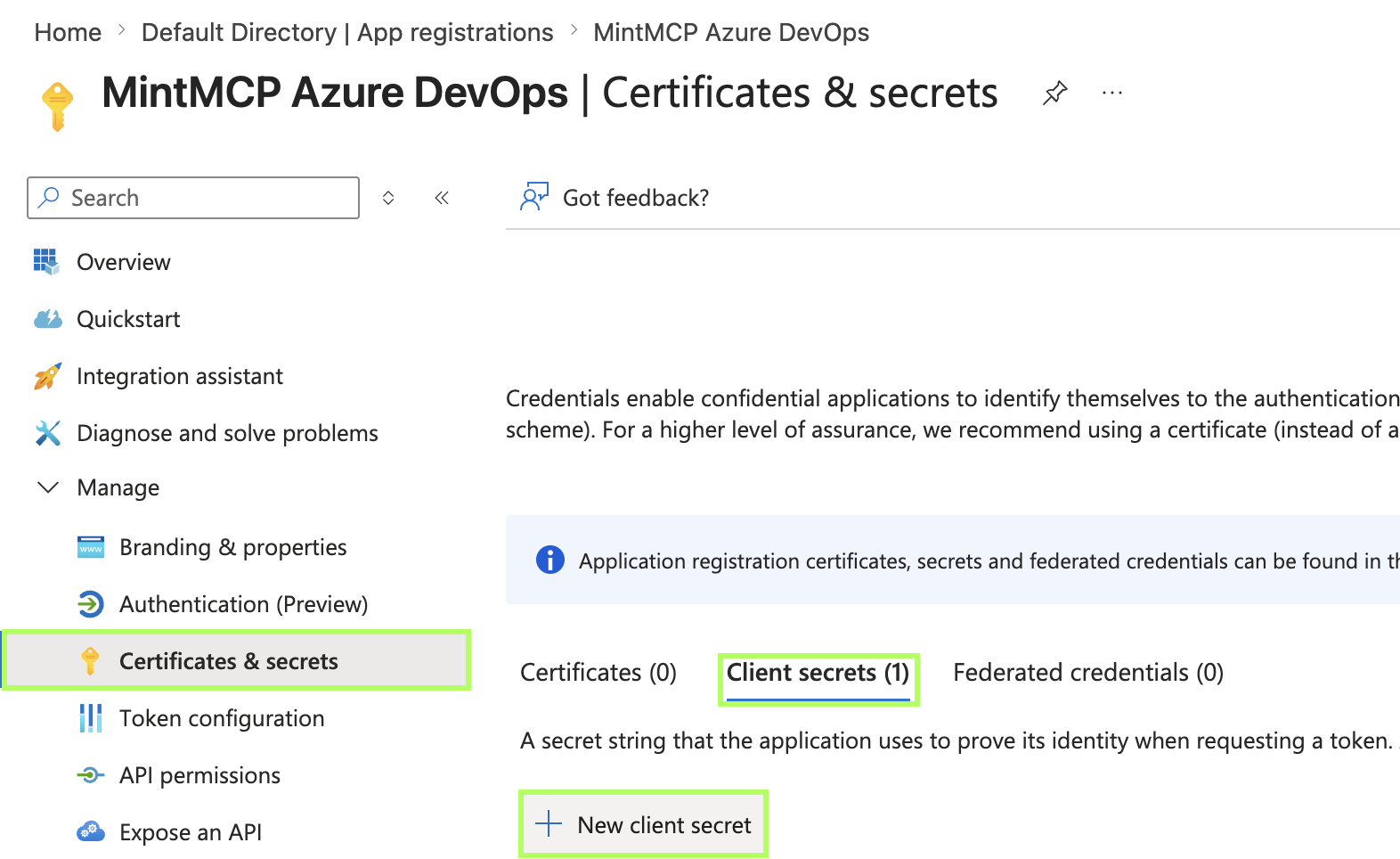
Go to Certificates & secrets > Client secrets > New client secret.
-
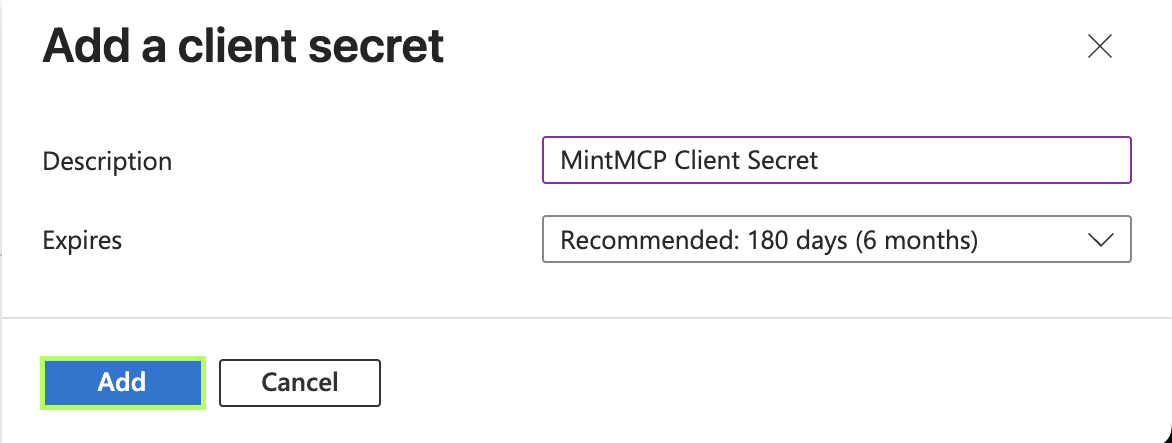
Enter a description and expiry, then click Add.
-
Copy the secret Value immediately, because it isn't shown again.

-
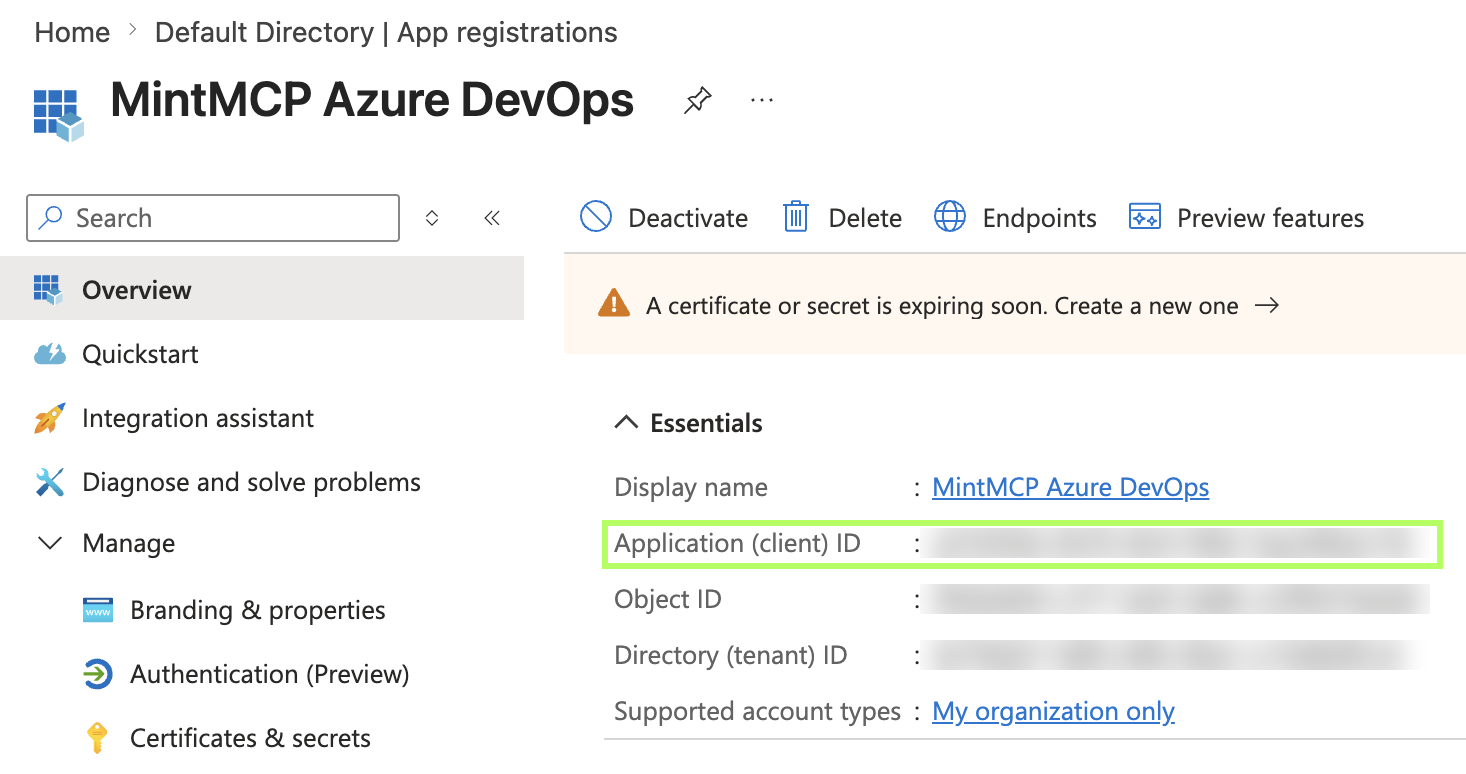
On the Overview page, copy the Application (client) ID.
Add Azure DevOps to MintMCP
Azure DevOps (Remote) is listed in the MintMCP recommended server catalog. Because Entra does not support dynamic client registration, you supply the client ID and secret from the app you registered above.
- In MintMCP, go to MCP store > Manage store.
- Find Azure DevOps (Remote) in the recommended servers list and click Install.
- Under OAuth Client Advanced Settings, paste the Application (client) ID in the Client ID field and the secret Value in the Client Secret field.
- Click Install.
Each user signs in with their own Microsoft account on first use, so tool calls run under their identity and Azure DevOps permissions.
Available tools
| Tool group | What it does |
|---|---|
| Core | Lists organizations, projects, and teams |
| Work items | Reads, creates, and updates work items, queries, comments, and links |
| Repositories | Reads repositories, branches, files, and commits, and manages pull requests |
| Pipelines | Reads builds, logs, and artifacts, and queues pipeline runs |
| Wiki | Reads and updates wiki pages |
| Work | Reads and updates iterations and team capacity |
| Test plans | Reads and updates test plans, suites, cases, and runs |
| Advanced Security | Reads Advanced Security alerts |
| Search | Runs full-text search across code, work items, and wikis |
If you want to limit what users can reach, disable tools with tool customization.
Troubleshooting
AADSTS700016: the sign-in went to a tenant that doesn't contain the app. Sign in with an account from the tenant where you registered the app.AADSTS650057: the app has no Azure DevOps MCP permissions, usually because the Azure DevOps API was added instead. Add the Azure DevOps MCP permissions and grant admin consent.- Azure DevOps MCP doesn't appear under APIs my organization uses: the enterprise application isn't provisioned. Run the
az ad sp createcommand above, then search by ID again. invalid_grantafter signing in: the token exchange failed. Check that the redirect URI uses the Web platform and that MintMCP has the secret Value, not the Secret ID.- No organizations or projects returned: the user isn't a member of an Azure DevOps organization connected to the tenant. Add them under Organization settings > Users.
Security considerations
- Each user authenticates with their own Microsoft account, so tool calls are bounded by their Azure DevOps permissions.
- The delegated permissions you consent to cap what any user can do through MintMCP. Grant only the
.readpermissions for a read-only deployment. - Client secrets expire after at most 24 months. Add a new secret and update it in MintMCP before the old one expires, or every connection fails.
- Entra Conditional Access policies apply to these sign-ins the same way they apply to Azure DevOps.
- All tool calls flow through the MintMCP gateway, so they are attributed to individual users in the audit log.
Next steps
- Tool customization: control which Azure DevOps tools are exposed to users
- Set up the Azure DevOps MCP server: use MintMCP's hosted server with personal access tokens instead
- MCP gateway administration: manage access and permissions across your MCP store