Zero data retention (ZDR)
MintMCP supports zero data retention (ZDR) on the Enterprise plan. With ZDR on, MintMCP does not store prompts, model responses, or tool-call arguments and results from the MCP gateway, the LLM gateway, or Agent Monitor. That content is never written to storage. MintMCP keeps only the operational metadata that dashboards, usage reports, and audit trails need.
This is the same meaning model providers give the term: no prompts or responses at rest after the request completes, with operational metadata retained.
Need ZDR for a security review, or want it on from day one? Talk to us.
What ZDR covers
| Not stored with ZDR on | Still kept (metadata) |
|---|---|
| System prompts, user messages, and agent responses | User and agent identity, and timestamps |
| Tool-call arguments and results | Tool name, status, and timing |
| LLM gateway prompt previews and tool-result previews | Model, token counts, cost, and latency |
| Content in OTLP, Splunk HEC, and SIEM exports | Policy outcomes, such as a rule match or a Mint Guard finding category. The matched value is never stored. |
| Daily usage reports (no content) |
Metadata follows your logs retention period, and daily usage reports follow your separate reports retention period. Each can be 7, 30, or 90 days.
Some content is never stored, even without ZDR:
- the raw hook payloads that coding agents send
- full LLM gateway request and response bodies
- model calls that don't go through MintMCP
How ZDR works
ZDR is two content settings, both turned off. In Enterprise settings > Settings > Retention, turn off:
- Agent conversations - full
- Tool calls - content
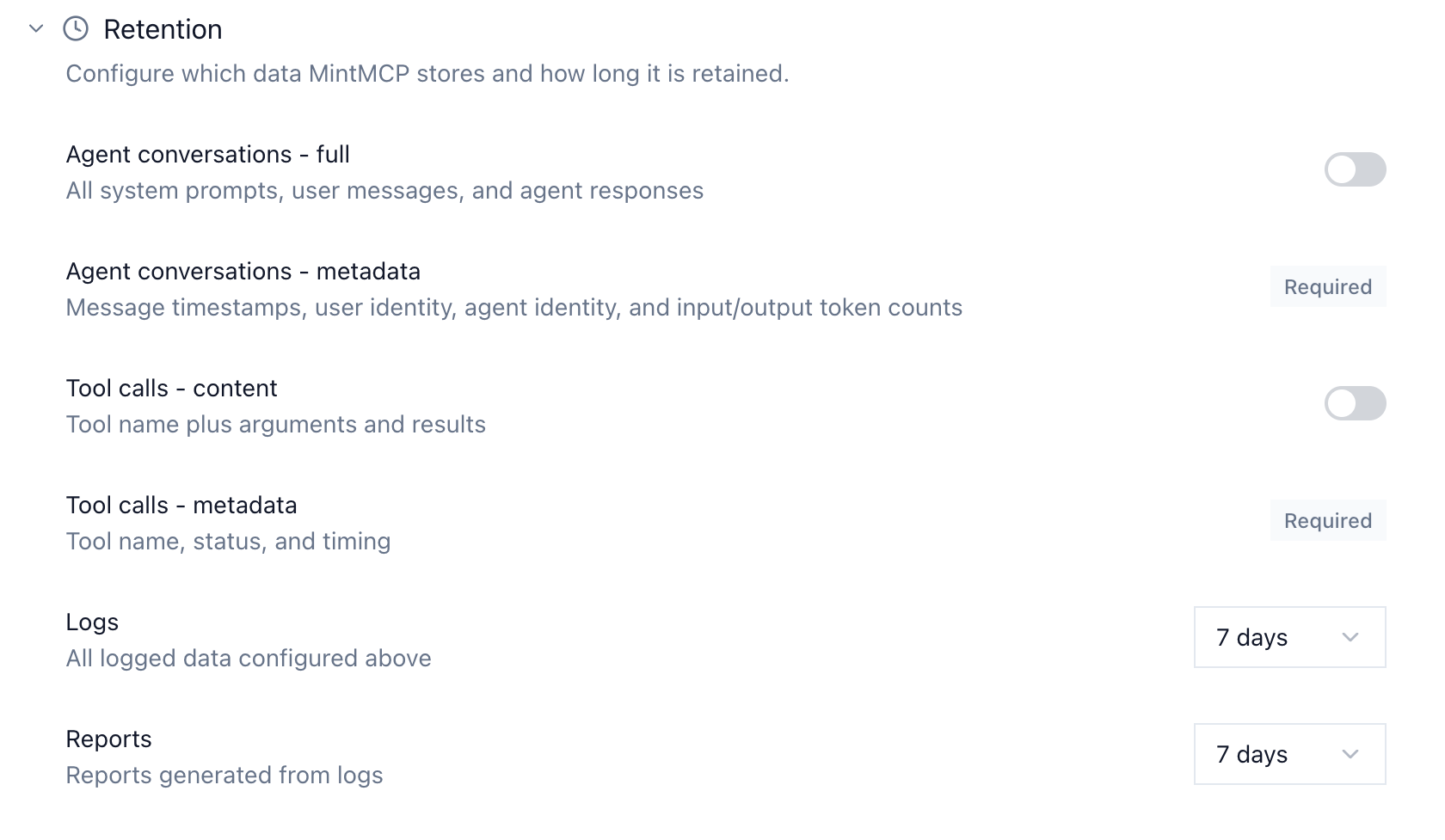
Content you turn off is never written in the first place, not stored and hidden. Changes take effect for new data within about a minute. Content stored before you turned on ZDR isn't removed automatically; contact MintMCP support to delete it.
Guardrails still work with ZDR on. Rules, gateway middleware, and Mint Guard inspect each call inline as it passes through. Turning off content storage only stops MintMCP from writing that content down. The audit trail still records who called which tool, when, and with what outcome.
Exceptions
- Tool-call approvals. If you require approval for a tool call, MintMCP stores a preview of that call's arguments so an approver can review it. The preview expires with your logs period.
- Mint Guard. When it's turned on, Mint Guard sends tool-call content to Google Cloud Model Armor for scanning, in your organization's region (US or EU). Model Armor processes content in memory and does not store it at rest (Google's documentation). Mint Guard is off by default.
- Coworker Agents. A Coworker Agent's run history keeps the full transcript of each run, and ZDR doesn't apply to it. The agent's model and tool calls that go through the MintMCP LLM gateway or MCP gateway follow your ZDR settings.
- Services you call from middleware. If your gateway middleware sends data to an external service, such as a DLP API, that service's retention policy applies.
Using MintMCP with your model provider's ZDR
Model providers' ZDR arrangements cover their own APIs. They generally don't cover the third-party MCP servers and tools an agent calls. Anthropic states that its MCP connector and third-party integrations are outside its ZDR arrangement (source), and OpenAI states that data sent to an MCP server is subject to that server's retention policy (source). With MintMCP's ZDR on, the tool traffic that flows through the MintMCP gateway isn't stored either, so the ZDR you negotiated with your model provider doesn't end at the tool call.
For your security review
- Data retention and permissions: the full reference for what MintMCP stores and for how long.
- Data residency: your organization runs in the US or the EU deployment, and data stays in that region.
- Compliance: SOC 2 Type II and HIPAA, with a BAA available. The SOC 2 report, Data Retention Policy, DPA, and subprocessor list are in the Trust Center.
- Deployment: VPC and self-hosted deployment are available on request.
- Plan: retention controls, including ZDR, are on the Enterprise plan.
FAQ
Does MintMCP offer zero data retention? Yes. On the Enterprise plan, you can configure MintMCP not to store prompts, responses, or tool-call content. Only metadata is kept.
Which MintMCP products does ZDR cover? The MCP gateway, the LLM gateway, Agent Monitor (Claude Code, Codex, Cursor, and GitHub Copilot hooks), and Claude Inference Hooks.
Is ZDR the same as turning off audit logs? No. Audit logs still record who called which tool, when, and the outcome. Only the content (prompts, responses, arguments, results) is left out.
Do guardrails still work with ZDR? Yes. Policies run inline on each call and don't depend on stored content.
Does ZDR apply to my SIEM exports? Yes. Exports are built from what MintMCP stores, so content you've turned off is never exported.
How do I get ZDR? It's a setting on the Enterprise plan. Contact us to enable it during onboarding or to review it with your security team.
Last reviewed: October 2026.