Agent Monitor rules
Create rules to detect and block dangerous agent actions. Access rules at Agent Monitor Rules.
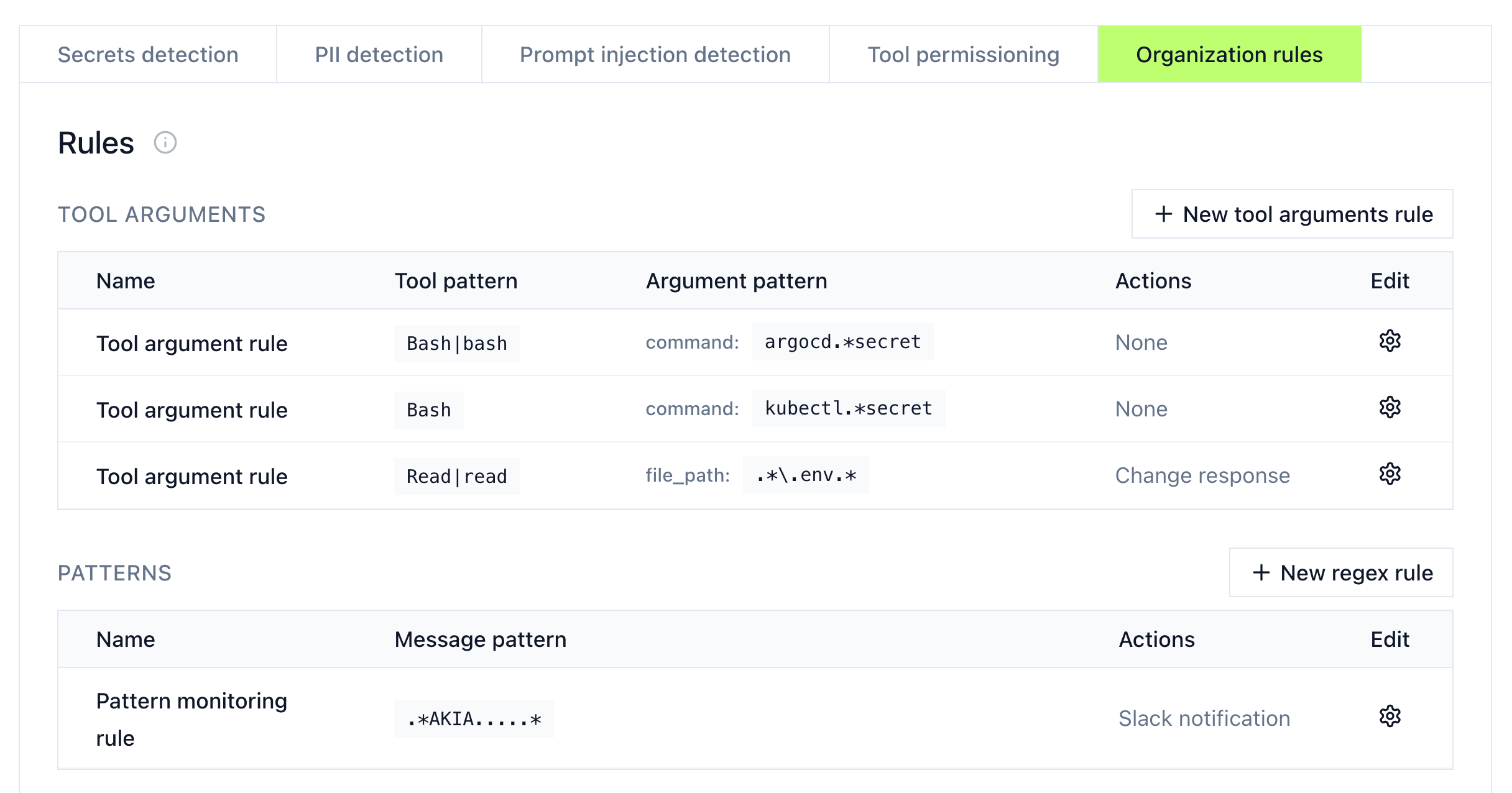
Built-in detection
| Category | What it detects |
|---|---|
| Secrets | API keys, access tokens, credentials being sent to models |
| PII | Personally identifiable information in agent interactions |
| Prompt injection | Potential injection attempts in prompts |
| Tool permissioning | Unauthorized tool access attempts |
Custom rules
Create organization-specific rules under the Organization Rules section.
Tool arguments rules
Match tool calls with specific argument patterns:
- Click + New tool arguments rule
- Set the tool pattern (e.g.,
Bash,Read|read) - Define argument conditions (e.g.,
command: kubectl.*secret) - Choose an action
Pattern rules
Match message content using regex:
- Click + New regex rule
- Define the pattern to match
- Choose an action
Actions
| Action | Effect |
|---|---|
| None (flag only) | Logs the action without blocking. Review at Live Activity. |
| Block | Stops the prompt or tool call from running and surfaces an error to the agent. |
| Mask | Redacts matching content (such as secrets or PII) and lets the agent continue with the redacted version. |
| Slack notification | Sends an alert to a Slack channel. |
Support matrix for block and mask
Block and mask don't work in every phase on every agent. Some combinations silently fall back to blocking, and others have no effect at all, so picking the right phase matters when you want masking to actually mask.
Claude Code
Claude Code uses a single hook system (PreToolUse / PostToolUse).
| Phase | Block | Mask |
|---|---|---|
| Prompt | ✅ Supported | ❌ Blocks instead |
Pre-tool (PreToolUse) | ✅ Supported | ✅ Supported |
Post-tool (PostToolUse) | N/A | ✅ Supported |
Cursor
Cursor ships two hook systems with different names. The newer preToolUse / postToolUse hooks line up with Claude Code's hook names and support masking; the older beforeMCPExecution / afterMCPExecution hooks fire only for MCP tool calls and can't mask. Pick the tab that matches the hooks registered in your ~/.cursor/hooks.json.
- New hooks (preToolUse / postToolUse)
- Old hooks (beforeMCPExecution / afterMCPExecution)
| Phase | Block | Mask |
|---|---|---|
| Prompt | ✅ Supported | ❌ Blocks instead |
Pre-tool (preToolUse) | ✅ Supported | ✅ Supported |
Post-tool (postToolUse) | N/A | ✅ Supported |
| Phase | Block | Mask |
|---|---|---|
Prompt (beforeSubmitPrompt) | ✅ Supported | ❌ Blocks instead |
Pre-tool (beforeMCPExecution) | ✅ Supported | ❌ Blocks instead |
Post-tool (afterMCPExecution) | N/A | ❌ No effect |
What this means in practice
- Mask in the prompt phase falls back to block. Neither agent supports rewriting a user prompt mid-flight, so a mask rule on a prompt stops the request entirely instead of redacting it. Scope the rule to a tool phase if you only want to redact.
- Post-tool block is N/A. Once a tool has run, blocking it isn't possible — write a pre-tool rule if you need to stop execution.
- Use Cursor's new hooks if you need masking. Only
preToolUseandpostToolUsecan redact content; the olderMCPExecutionhooks always fall back to block.
Manage rules
Edit or delete rules using the settings icon next to each rule.