

Today, Cursor announced a hooks partnership program with ecosystem vendors including MintMCP. This post describes how we use Cursor's hooks to provide MCP governance and visibility for enterprise teams.
MCP servers are spreading rapidly through engineering organizations: someone installs Linear for ticket context, someone else adds Figma for design specs, a few people connect database MCPs for quick queries, and before long there are dozens of servers running across the team. But most organizations have no idea what's actually installed. MCP servers get shared in Slack threads, copy-pasted from GitHub READMEs, distributed through Notion docs, and are often never removed. There's usually no central registry, no visibility into what data flows through these connections, and no policy governing what's allowed.
To address this, most companies take one of two approaches. Some embrace experimentation and let people install whatever they want, accepting the productivity gains while hoping nothing goes wrong. Others lock things down entirely, prohibiting MCP servers and limiting agents to basic file and terminal access. Even though the second approach feels safer, it throws away the productivity benefits that make agentic workflows valuable in the first place. Neither option is great.
In this post, we propose a different approach: using Cursor's hook system to gain visibility into every MCP call across an organization, then layering governance on top of that visibility. The core insight is that we don't need to choose between security and productivity: we can enable MCP experimentation while maintaining complete awareness of what's happening.
We describe how hooks can enable MCP governance by intercepting every MCP tool call at the agent level, sending telemetry to a centralized gateway, and enforcing policies based on what we observe.
MCP tool call hooks
Cursor provides intervention points in the agent execution lifecycle called hooks. We focus on the beforeMCPExecution hook which fires every time the agent is about to invoke an MCP tool. The hook receives everything we need: the server being called, the tool name, the arguments being passed, and the MCP configuration including the URL or command used to start the server.
A hook script processes this data and returns one of three decisions: allow to let the call proceed, deny to block it, or ask to prompt the user for confirmation. We can also attach a user_message that gets displayed in the Cursor UI explaining what's happening, and an agent_message that gets injected into the agent's context so it understands why a call was blocked or flagged.
Here's how this looks in practice. An engineer asks the Cursor Agent to retrieve details from a Linear issue. The agent decides to call the Linear MCP's get_issue tool with argument id: "ENG-420". Before that call executes, our beforeMCPExecution hook fires and sends the tool call details to a MCP gateway. The gateway logs the call, checks it against our policies, and returns allow. The call proceeds normally. The user never notices anything different, but we now have a record of exactly what was called, when, by whom, and with what arguments.
Building an inventory
In the first week of using the tool call hooks, we're just collecting data. Every MCP tool call across the organization flows through the hook into the gateway, which builds an inventory of servers, tools, and usage patterns automatically.
After a week of data collection, we now have an inventory of, and deep visibility into all the distinct MCP servers installed across the organization. We might find some that we recognize: Linear, GitHub, the official Figma MCP. In practice, we also find surprises: SQL servers from experiments months ago still installed, or new servers that teams are testing out from Stripe to Wiz.
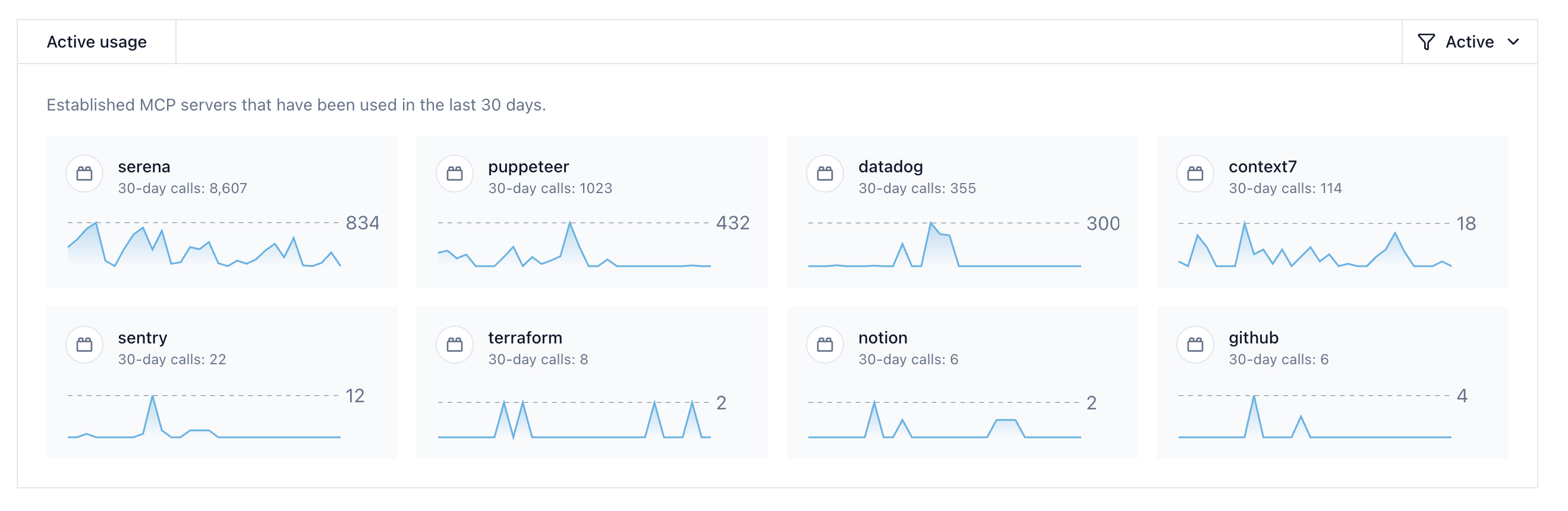
Active MCP server usage dashboard showing tool call frequency across an organization
With this visibility, we can set policies based on real data rather than guessing. We allow the servers we've vetted and configure unknown servers to require review before calls go through. We can set the Stripe MCP to return ask for any write operation, with a user_message explaining: "This will modify production payment data. Confirm to proceed." The same infrastructure we built for logging can now also enforce the security boundaries we've decided on.
Tool response hook
Cursor also provides an afterMCPExecution hook that fires after a tool returns its response but before that response enters the agent's context window. This matters because MCP tools return data that might contain data we don't want flowing into an AI model; for example, customer PII from an Intercom tool, API keys returned from a configuration lookup, or prompt injection payloads embedded into user generated content. The afterMCPExecution hook lets us scan responses before they reach the agent, allowing us to both observe and act upon risks in these responses.
Centralizing visibility
The greater value for hooks emerges when we centralize policies across an entire organization.
An MCP gateway service aggregates beforeMCPExecution and afterMCPExecution telemetry from every Cursor user in the org. It normalizes MCP configurations across all coding agents so the same server installed everywhere maps to the single endpoint. It provides dashboards showing server inventory, tool usage patterns, policy violations, and anomalies worth investigating.
When security asks "what AI tools are accessing company data?", we now have an answer. When a compliance audit requires an inventory of AI data access, we have audit logs. When someone installs an MCP server that connects to a system it shouldn't, we find out immediately from a real-time alert.
Getting started
For individuals who want to experiment: add a beforeMCPExecution hook in Cursor settings that logs every MCP call to a file. Use Cursor normally for a day, then review what was captured.
{
  "version": 1,
  "hooks": {
    "beforeMCPExecution": [
      {
        "command": "bash -c 'cat >> ~/mcp-calls.log'"
      }
    ]
  }
}
This appends every MCP tool call to ~/mcp-calls.log. Each entry includes the server name, tool, and arguments.
For organizations: deploy a gateway service, distribute a standard hook configuration to the team, and collect data for at least a week and then set policies. By understanding actual usage patterns first, you can define policies that are aligned to how users benefit from MCPs. Starting permissive and tightening based on data is much easier than starting restrictive and then figuring out what legitimate workflows are being blocked.
MCP governance with hooks
Hook support isn't unique to Cursor. Claude Code and Gemini CLI have equivalent capabilities, and is one of the top requested features with Codex. As coding agents become standard tools, MCP governance is becoming essential infrastructure with visibility as the foundation.
MCP gateways can add further governance controls by creating custom registries to control what MCPs are allowed, limiting the specific tools available, and adding authentication and audit requirements. Get started with MintMCP.
Learn more about MCP security in our paper with Vanta: Security Challenges of the Model Context Protocol.
